
The choice between building a Native Mobile App and a Web App is not merely a technical preference; it could be the single most defining decision for your digital product.
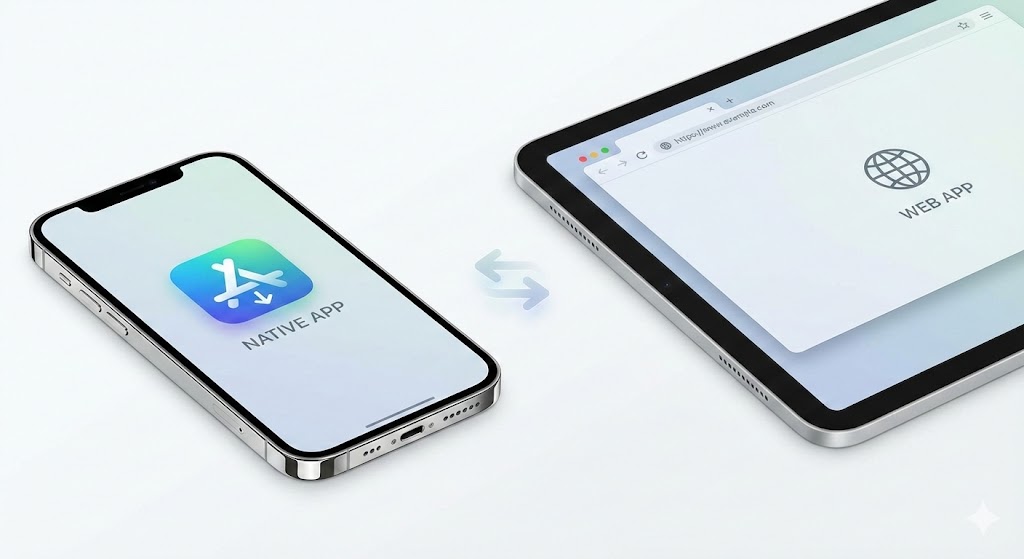
It comes down to one fundamental trade-off: Depth vs. Breadth.
- Native Apps offer depth: Unmatched performance, hardware integration, and a premium user experience, but they sit behind the “gate” of an app store installation.
- Web Apps offer breadth: Instant accessibility via a URL and universal reach, but they sacrifice raw power and deep device integration.
This guide breaks down the strategic, financial, and technical realities of both paths to help you define your digital product strategy.
I. Defining the Product Strategy
Before a single line of code is written, you must audit your business goals. The technology you choose dictates your marketing funnel, your development budget, and your user retention strategy.
Ask yourself the following to anchor your decision:
- The Acquisition Channel: Do you want to compete in the crowded App Store ecosystem (Native), or rely on Google Search and social sharing (Web)?
- The “Hardware” Test: Does your product require heavy use of the camera, biometrics (FaceID), complex gestures, or background processing?
- The Resource Reality: Native development requires building two distinct products (iOS and Android). Do you have the budget and timeline for dual development tracks?
- The Update Cycle: Does your business require instant iterations? Web apps update instantly; native apps require user downloads and store approval.
II. The Experience Gap: Performance & UX
User expectations are higher than ever. If an application feels sluggish or “foreign” to the operating system, abandonment rates spike.
The Native Advantage
Native apps are written in the specific language of the device (Swift for iOS, Kotlin for Android). They communicate directly with the hardware without an interpreter.
- Fluidity: Animations run at 60fps. Scroll physics feel natural.
- Integration: The app feels like part of the phone. It can read contacts, use the GPU for gaming, and interact with other apps seamlessly.
- Trust: Adhering to Apple’s Human Interface Guidelines or Google’s Material Design creates an immediate sense of familiarity and trust.
The Web Reality (and the Rise of PWAs)
Web apps run inside a browser shell. While browsers are powerful, they add a layer of abstraction between the code and the hardware.
- The Ceiling: Complex visualizations or heavy data processing will always lag behind native speeds.
- The PWA Solution: Progressive Web Apps (PWAs) have narrowed the gap. They allow web apps to offer “app-like” features such as home screen icons, basic push notifications, and limited offline usage (via service workers).
- The Verdict: For content consumption, the web is fine. For content creation or immersive interaction, native wins.
Feature Comparison Matrix
| Feature | Native Mobile App | Web App / PWA |
| Distribution | App Store / Google Play (Gatekeepers) | Open Web / URL (Search Engines) |
| Performance | Maximum speed; Direct hardware access | Browser-dependent; Good for utility |
| Development | Dual Codebase (High Effort) | Single Codebase (Efficient) |
| Updates | User must download updates | Instant global deployment |
| Offline Mode | Robust; Database local to device | Limited; Caching only |
| Device Access | Full (Camera, AR, Bluetooth, Contacts) | Restricted / Permission-based |
III. The Financials: Cost and Time-to-Market
This is often the deciding factor. The cost structure of the two approaches is radically different.
The Native Premium
Going native generally means paying a “complexity tax.”
- Talent: You need specialized iOS developers and Android developers. These are distinct skill sets.
- Maintenance: Every bug fix must be applied twice. Every OS update (e.g., iOS 18) requires testing on two platforms.
- Time: Developing two parallel apps typically doubles the time-to-market compared to a web solution.
The Web Efficiency
Web apps utilize a “Write Once, Run Anywhere” philosophy.
- Unified Team: One team using standard technologies (HTML, CSS, JavaScript) builds a product that works on iPhone, Android, and Desktop.
- Agility: You can launch a Minimum Viable Product (MVP) rapidly to test the market, then iterate daily without waiting for App Store approval queues.
IV. Discovery: How Will They Find You?
Your distribution strategy is just as important as your tech stack.
App Store Optimization (ASO) – The Native Path
- Pros: Being on the App Store confers legitimacy. Users trust apps they download there.
- Cons: It is a walled garden. You must fight for keywords, screenshots, and ratings. You are also subject to the platform’s arbitrary rules and 15-30% revenue cuts.
Search Engine Optimization (SEO) – The Web Path
- Pros: The open web has the widest net. Your content is indexed by Google. A user can click a link in an email or social post and be using your product in seconds.
- Cons: You lack the “real estate” on the user’s home screen unless they manually save your site there.
V. Decision Framework: Which Path is Yours?
Choose Native Integration If…
- Performance is the Product: You are building a game, a photo/video editor, or an AR tool.
- Offline is Critical: Your users need full functionality in a subway tunnel or remote location (e.g., Spotify, Google Maps).
- Hardware Dependency: You need background location tracking, Bluetooth pairing, or deep biometric security.
- Habit Formation: You want to live on the home screen and use robust push notifications to drive daily engagement.
Choose Web Application If…
- Reach is Priority #1: You want to remove all friction. No downloads, just a link.
- Budget is Tight: You need to validate a startup idea without funding two engineering teams.
- Content is King: You are an e-commerce store, a news outlet, or an educational platform. (See: Wikipedia or Amazon—their web experience is the primary driver).
- Rapid Iteration: You plan to update the product multiple times a week based on user feedback.
Examples
Here are examples categorized by product type, explaining why they chose their specific path based on the “Depth vs. Breadth” trade-off.
“Heavy Lifters” (High Performance & Hardware Interaction)
These products require intense computing power, complex graphics, or deep integration with the phone’s physical sensors.
The Native Example: Pokémon GO (or any high-end mobile game)

Pokémon GO could not exist as a functional web app today. It demands too much simultaneously.
- Why it MUST be Native: It requires real-time 3D graphics rendering (using the GPU) overlayed onto a live camera feed (Augmented Reality), all while tracking precise GPS location in the background. The battery drain and processing power required are immense, and only native code can manage that efficiently.
The Web App Alternative: Wordle (The NY Times)

Wordle is a massive global hit built entirely on web technology.
- Why Web works perfectly: The game mechanics are simple (text and colored boxes). It requires zero hardware access (no camera, no GPS). Its success was driven by viral sharing of links on social media. Requiring users to download an app store to play a 3-minute daily word game would have killed its viral growth instantly.
The “Daily Utilities” (Offline & Background Reliance)
These are tools users rely on implicitly, often when they aren’t actively looking at their screens or when they have no signal.
The Native Example: Google Maps / Waze
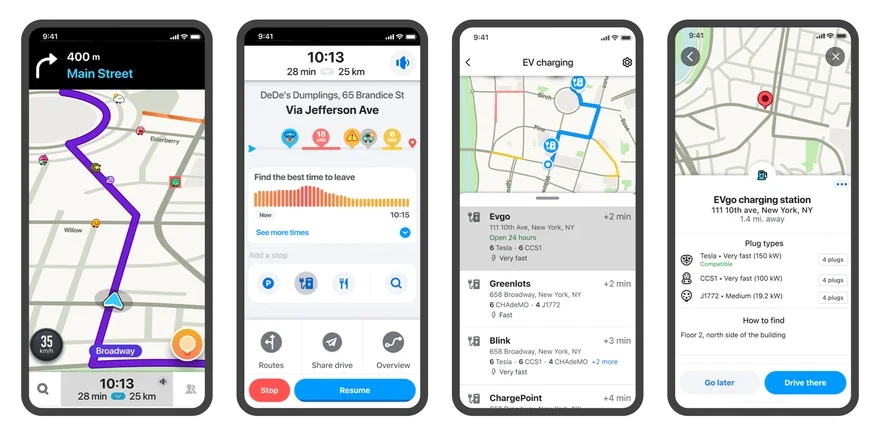
While you can use Google Maps in a mobile browser, the experience pales in comparison to the native app.
- Why it MUST be Native: The core feature is turn-by-turn navigation that continues running when your phone is locked in your pocket or car mount. Web apps generally cannot run heavy processes in the background like this. Furthermore, native apps allow you to download massive map areas for reliable offline use when driving through dead zones.
The Web App Alternative: Google Docs / Trello

While these have native apps, their Web App versions are incredibly powerful and often preferred by desktop users.
- Why Web works perfectly: The primary goal is real-time collaboration on shared documents. Browsers are highly optimized for sending text and data back and forth to a server instantly. While they have some offline caching, they assume you will generally have an internet connection to sync your work.
The Media Giants (Engagement & Persistence)
These companies need to keep you hooked, bring you back often, and ensure smooth playback.

The Native Example: Spotify / Netflix
If you are getting on a 6-hour flight, you are using the native app, not the website.
- Why it MUST be Native: The killer feature here is robust, encrypted offline storage. Downloading gigabytes of high-definition video or thousands of songs to secure device storage is a native specialty. Furthermore, they need deep OS integration to control playback from your locked screen, headphones, or car stereo.
The Web App Alternative: YouTube (Mobile Web)

Millions of users watch YouTube daily without ever installing the app.
- Why Web works perfectly: YouTube’s primary goal is massive, frictionless reach. If someone sends you a video link in a text message, they want you to watch it now, not after visiting an app store. The mobile web experience is “good enough” for streaming a quick clip, prioritizing instant access over premium features.
E-Commerce and Content (Discovery vs. Loyalty)
This is the clearest battleground between Search Engine Optimization (Web) and App Store Optimization (Native).
The Native Example: The Amazon App

Amazon wants to live on your home screen.
- Why it MUST be Native: They want to remove friction from buying. Native allows them to securely store payment biometrics (FaceID to buy), send push notifications about shipping delays, and provide a faster, smoother scrolling experience through thousands of products than a mobile browser can usually handle.
The Web App Alternative: A Niche Shopify Store or News Site

If you are launching a new brand of sustainable sneakers, you don’t start with a native app.
- Why Web works perfectly: Nobody is going to the App Store to search for “new sneaker brand.” They find you via Google Ads, Instagram links, or SEO blogs. Your first priority is acquisition through the open web. You need a frictionless checkout process in the browser. Asking a first-time visitor to download an app just to buy one pair of shoes is a massive barrier to a sale.
Summary Decision Table
Use these examples to locate where your product concept fits.
| If your product needs to do this… | Look at this example… | The Likely Path is… |
| Heavy use of Camera, AR, or complex 3D graphics. | Pokémon GO / Snapchat | Native |
| Reliable navigation or tracking while the phone is locked. | Waze / Google Maps | Native |
| Downloading large amounts of content for true offline use. | Netflix / Spotify | Native |
| Simple interaction that depends on viral link sharing. | Wordle | Web App |
| Primary discovery will be through Google Search (SEO). | News Sites / Niche E-commerce | Web App |
| Real-time text/data collaboration across many device types. | Google Docs / Trello | Web App |
VI. Frequently Asked Questions
Q: Can a Web App really work without the internet?
A: Sort of. Using “Service Workers,” a Web App can cache parts of the site so it loads when offline. However, it cannot replicate the complex database interactions or heavy offline logic of a Native App.
Q: What about “Hybrid” Apps?
A: Hybrid apps (built with tools like React Native or Flutter) are the middle ground. You write code in a web-like language, and it compiles into a Native app. It saves money compared to pure Native but can still suffer from slight performance hiccups compared to “pure” Swift or Kotlin code.
Q: Which is better for user retention?
A: Generally, Native Apps. Once a user goes through the effort of installing your app, they have made a commitment. The presence of the icon on their screen and the ability to receive system-level notifications usually leads to higher long-term retention than a transient web visitor.